
Download TennisBoard3Dx – Free Mac Tennis Scoring & Management Tool
Overview
TennisBoard3Dx is a free, lightweight application designed specifically for Mac users who want a reliable, easy‑to‑use platform for managing tennis scores, player statistics, and tournament brackets. Developed by the seasoned software engineer Yasuji Murakami, the program blends a clean, intuitive interface with powerful features that cater to casual players, club administrators, and competitive coaches alike. Available in both English and Japanese, TennisBoard3Dx removes language barriers and provides a seamless experience for a global tennis community.
Whether you’re tracking a friendly weekend match or organizing a multi‑day league event, the software delivers real‑time updates, customizable player profiles, and exportable reports that can be shared with teammates or posted on club websites. Its free licensing model makes it an attractive alternative to expensive commercial scoring systems, while its regular updates ensure compatibility with the latest macOS releases. In short, TennisBoard3Dx is the go‑to solution for anyone looking to bring order, clarity, and a dash of professionalism to their tennis activities without spending a dime.
Key Features of TennisBoard3Dx
- Live Scoring Dashboard: Real‑time match tracking with instant score updates and visual set indicators.
- Player Profiles & Statistics: Store detailed player information, win/loss records, and performance trends.
- Tournament Bracket Builder: Create single‑elimination, double‑elimination, or round‑robin brackets with drag‑and‑drop simplicity.
- Multi‑Language Support: Interface available in English and Japanese, with easy language switching.
- Export & Print Options: Generate PDF summaries, CSV data files, or printable scorecards for offline review.
- Customizable Match Settings: Adjust game formats, tie‑break rules, and scoring methods to match local club regulations.
- Secure Data Storage: All match data is saved locally on your Mac with optional cloud backup via iCloud.
- Free Updates & Support: Regular patches and feature enhancements released at no cost, with a dedicated support forum.
Each feature has been thoughtfully crafted to minimize the learning curve while maximizing functionality. For instance, the Live Scoring Dashboard not only displays scores but also highlights the server, shows point history, and automatically switches sides after each set. The Tournament Bracket Builder supports automatic seeding based on player rankings, saving organizers hours of manual work. Moreover, the export options empower coaches to analyze performance trends using familiar spreadsheet tools, while the printable scorecards ensure that even low‑tech venues can keep accurate records. All of these capabilities come together in a cohesive package that feels native to macOS, thanks to the use of Apple’s native frameworks and a design language that mirrors the look and feel of modern macOS applications.
Installation & Usage Instructions
Step‑by‑Step Installation
Getting started with TennisBoard3Dx is straightforward. First, visit the official download page (linked in the conclusion) and click the “Download for macOS” button. The file will be a compressed .dmg package. Open the DMG, then drag the TennisBoard3Dx icon into your Applications folder. macOS may warn you about an unidentified developer; simply open System Preferences → Security & Privacy and click “Open Anyway” to allow the app to run. Once installed, you can launch the program from Launchpad or the Applications directory.
Initial Setup
On first launch, you’ll be prompted to select your preferred language (English or Japanese) and to create a default club profile. This profile stores basic information such as club name, location, and contact details. After saving, you can start adding players by clicking the “Add Player” button. The player entry form asks for name, age, skill level, and optional photo. All data is stored locally, but you can enable iCloud sync from the settings menu to keep your database backed up across devices.
Running a Match
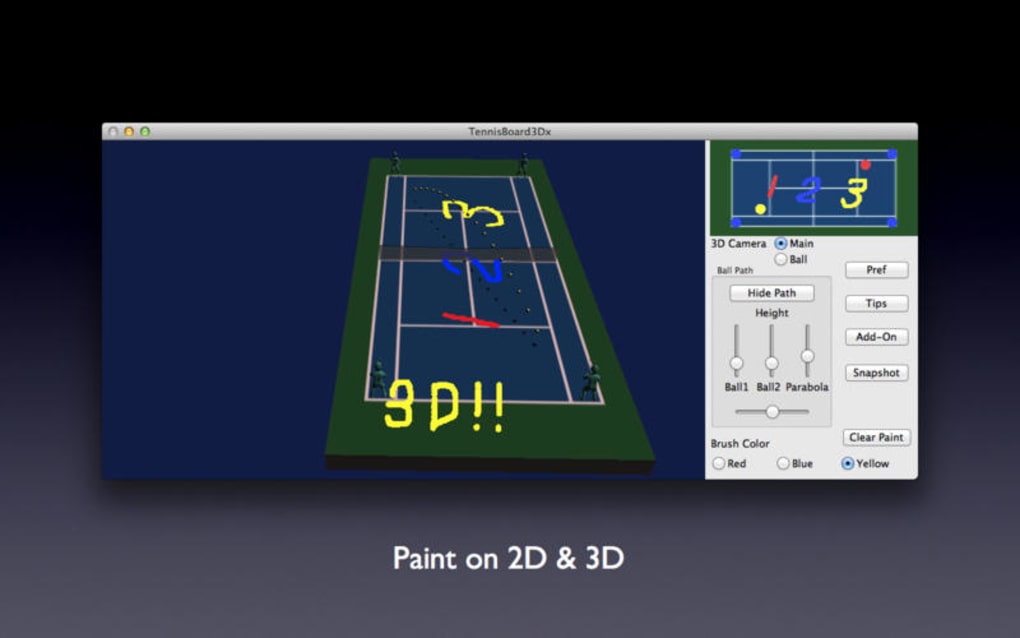
To record a match, select “New Match” from the main menu, choose the two players (or teams) from your roster, and configure the match type (e.g., best‑of‑3 sets, tie‑break at 6‑6). The Live Scoring Dashboard will appear, displaying a large score area, a point‑by‑point log, and buttons for incrementing or decrementing points. You can also record serve faults, double faults, and unforced errors by clicking the corresponding icons. When the match concludes, TennisBoard3Dx automatically generates a summary report, which you can view, print, or export.
Tournament Management
For larger events, the “Tournament” module lets you import a list of participants via CSV or manually add them. Choose a bracket type, set seeding preferences, and the software will auto‑populate the draw. As matches finish, simply update the scores in the dashboard; the bracket will update in real time, showing winners advancing to the next round. You can also publish the bracket to a public URL, allowing spectators to follow the competition from any device.
Overall, the installation process takes less than five minutes, and the intuitive workflow ensures that even users with limited technical experience can start scoring matches within minutes.
Compatibility and System Requirements
TennisBoard3Dx is built exclusively for macOS, supporting versions from macOS 10.14 (Mojave) through the latest macOS 15 release. The application runs natively on both Intel‑based Macs and Apple Silicon (M1, M2, and later) thanks to universal binary packaging. Minimum hardware requirements include a 1.4 GHz processor, 2 GB of RAM, and at least 150 MB of free disk space for the application and user data. While the program does not require an internet connection for core scoring functions, an active connection is needed for iCloud backup, automatic update checks, and accessing the online help forum.
Because TennisBoard3Dx leverages Apple’s native frameworks, you can expect smooth performance even on older MacBook Air models. The UI scales gracefully on Retina displays, and the app respects macOS dark mode, automatically adjusting colors for reduced eye strain. Additionally, the software integrates with macOS’s built‑in accessibility features, offering VoiceOver support and keyboard navigation for users who rely on assistive technologies.
For clubs that maintain a mixed‑device environment (Windows PCs, Android tablets, iOS phones), TennisBoard3Dx can still play a central role by exporting data in universally readable formats such as CSV and PDF. These files can be opened on any platform, allowing coaches to share match statistics with players regardless of their device. However, a native Windows or mobile version of the application is not currently available, and users are encouraged to use the exported files or consider a web‑based alternative for cross‑platform scoring.
Pros & Cons
- Pros:
- Completely free with no hidden fees.
- Intuitive macOS‑native interface.
- Robust tournament management tools.
- Dual‑language support (English & Japanese).
- Exportable data for cross‑platform sharing.
- Regular updates and active community support.
- Cons:
- Only available for macOS; no Windows or mobile apps.
- Advanced analytics require manual CSV handling.
- No built‑in live streaming integration.
- Initial setup may be daunting for absolute beginners.
Frequently Asked Questions
Is TennisBoard3Dx really free?
Yes, the application is completely free to download and use. There are no subscription fees or in‑app purchases. All core features, including tournament management and data export, are available at no cost.
Can I use TennisBoard3Dx on a Windows PC?
Currently, TennisBoard3Dx is a macOS‑only application. Windows users can still benefit by importing exported CSV or PDF files into compatible Windows software, but a native Windows version is not planned at this time.
How does the iCloud backup work?
When you enable iCloud sync in the settings, all player profiles, match results, and tournament data are stored in your iCloud Drive. This ensures that your data is automatically backed up and can be restored on any Mac signed in with the same Apple ID.
Is there a way to customize the scoring rules?
Yes, the “Match Settings” panel allows you to adjust set length, tie‑break thresholds, and even create custom scoring formats such as “no‑ad” or “pro‑set” rules, making the app suitable for a wide range of club regulations.
Can I share live scores with spectators?
While TennisBoard3Dx does not have built‑in live streaming, you can publish the tournament bracket or match summary as a public URL. Spectators can open the link on any device to view real‑time updates.
Conclusion & Call to Action
TennisBoard3Dx stands out as a polished, free solution for Mac users who need a dependable tool to manage tennis scores, player stats, and tournament brackets. Its macOS‑native design, bilingual support, and robust feature set make it a compelling choice for clubs, coaches, and casual players alike. Although the lack of a Windows version and limited advanced analytics may be drawbacks for some, the overall value proposition is strong—especially considering that no other free Mac‑only tennis scoring app offers this level of functionality. If you’re looking to streamline match day operations, keep accurate records, and share results with ease, TennisBoard3Dx is ready to serve. Download TennisBoard3Dx today from the official website, install it in minutes, and experience the difference a dedicated tennis scoring tool can make for your game.







